
10 Best Ring Builder Apps for Jewelry Websites (2025)
Finding the right ring builder app means the difference between customers who bounce after two minutes and customers who spend 20 minutes designing their dream engagement ring before hitting "add to cart." The wrong choice leaves you with clunky interfaces, frustrated shoppers, and a developer invoice that makes you wish you'd stuck with static product photos.
This guide breaks down the 10 best ring builder apps for jewelry websites, comparing features, pricing models, and real capabilities so you can choose the solution that actually fits your business. You'll learn what separates basic configurators from professional-grade tools, which features drive conversions versus which ones just look impressive in demos, and how to launch your builder without months of technical headaches.
What Is a Ring Builder App and Why Your Jewelry Site Needs One
A ring builder app is interactive software that lets customers design custom rings on your website by choosing diamonds, settings, metals, and other design elements in real time. The tool solves a specific problem: people want personalized jewelry but can't physically visit a store to work with a jeweler. By moving the custom design process online, these apps let you offer unlimited variations without storing thousands of physical products.
The numbers tell a clear story. Jewelry stores using ring builders typically see conversion rates jump by 30-40% compared to regular product pages, mainly because customers feel attached to pieces they've designed themselves. Customer service questions drop when shoppers can see exactly how different options look together. You can also sell made-to-order pieces, which means you're not spending money on inventory that might sit unsold for months.
Real-Time 3D Configurator
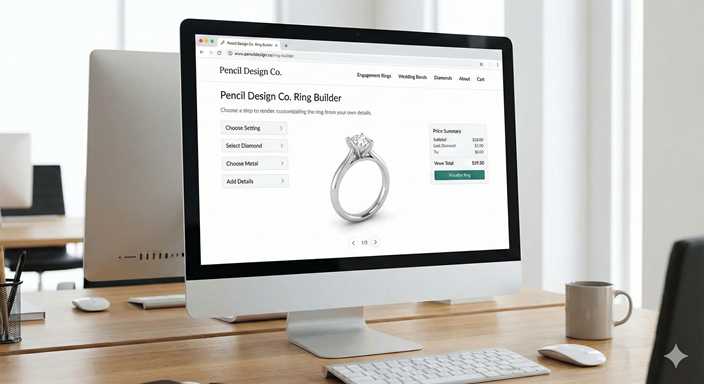
The core feature of any ring builder is its 3D configurator, which updates the ring design instantly when customers change options like metal color or stone shape. What separates good builders from disappointing ones is rendering quality—customers need to see accurate reflections, metal textures, and how light moves through stones. The best configurators use ray-tracing technology to simulate real light behavior, creating images that look like professional jewelry photos.
Virtual Try-On and Augmented Reality
Augmented reality features use smartphone cameras to show how a ring looks on a customer's actual hand. The technology overlays the 3D ring model onto a live video feed of their hand. This addresses a major obstacle in online jewelry sales: people can't tell if a ring will look too big, too small, or just right until they see it on their hand. AR features can reduce return rates by up to 25% because customers know what to expect before buying.
Diamond Feed Integration With RapNet, VDB, or Nivoda
RapNet, Virtual Diamond Boutique (VDB), and Nivoda are wholesale diamond networks that collect inventory from thousands of diamond dealers worldwide. When a ring builder connects to these feeds, your customers can browse hundreds of thousands of certified diamonds without you buying or storing any stones. The integration updates pricing automatically based on current market rates and removes sold stones from your selection instantly.
Production-Ready CAD Downloads
CAD stands for Computer-Aided Design—digital blueprints that manufacturers use to create physical jewelry through 3D printing, CNC milling, or traditional casting. When a ring builder creates production-ready CAD files (usually STL or 3DM formats), you can send the design straight to your manufacturer without redrawing anything. This direct handoff eliminates errors, cuts lead times from weeks to days, and removes the back-and-forth communication that usually slows custom orders.
Pricing Models and Transaction Fees
Ring builder apps typically charge in one of three ways: monthly subscriptions ($50 to $500+ based on features), one-time setup fees (often $5,000 to $25,000 for enterprise options), or transaction fees (usually 2-5% per sale). Subscription models work well for stores with steady traffic, while transaction fees can be more economical when you're just starting out. Watch for hidden costs like charges for extra product options, premium support, or bandwidth overages during busy periods.
Site Speed and Core Web Vitals Impact
3D configurators can slow down your website significantly, which affects both user experience and Google rankings. Ring builders that load large 3D files immediately can push your Largest Contentful Paint score past Google's recommended 2.5 seconds. Look for solutions that use progressive loading—showing a regular image first, then loading the 3D model—or lazy loading, which only activates the configurator when someone clicks to use it.
Key Features to Compare Before You Choose
Beyond letting customers pick stones and metals, ring builders differ significantly in flexibility, integration options, and how they actually feel to use. Mobile responsiveness matters more than you might think—over 60% of jewelry shoppers browse on phones. A configurator that's clunky on mobile will cost you sales.
Customization flexibility determines whether the builder can match your brand and product line. Can you change interface colors, fonts, and layout to match your website? Can you add engraving options, unusual stone types, or unique settings that make your offerings different? Some builders lock you into their predetermined choices, while others let you control every detail.
Features that matter most:
- Pricing rule flexibility: Setting markups, discounts, or promotional pricing
- Email capture: Saving designs and collecting customer information for follow-up
- Multi-language support: Critical for international customers
- Analytics integration: Tracking which options customers select and where they stop
Nice additions that improve experience:
- Comparison tools: Viewing multiple designs side-by-side
- Social sharing: Getting feedback before purchasing
- Consultation booking: Scheduling appointments with jewelers
- Wishlist functionality: Saving multiple designs for later
10 Best Ring Builder Apps for Jewelry Websites
1. Pencil
Pencil is the only parametric CAD-powered ring builder that gives you complete design freedom without technical skills or developer help. Unlike other options that limit you to pre-made templates, Pencil generates production-ready STL files from scratch based on customer choices, offering over five million combinations across rings, earrings, necklaces, and bracelets. The platform provides instant design quotes, live pricing, and photorealistic images you can publish to your website—without setup fees. You can start designing in minutes without preparing 3D files or hiring developers.
2. VDB Ring Creator
VDB Ring Creator focuses on Shopify stores and connects directly to Virtual Diamond Boutique's diamond inventory network. The app uses a one-time setup fee rather than monthly subscriptions, which appeals to established jewelers who prefer paying upfront. VDB's strength is its diamond-first approach—customers filter by cut, clarity, carat, and certification however it's limited to just VDB's diamond sources.
3. Gemvision CounterSketch
CounterSketch positions itself as the professional option for established jewelry retailers who need advanced CAD capabilities. Jewelers have used the platform for over two decades, and it offers sophisticated design tools beyond basic configurators, including custom stone layouts and detailed metalwork options. CounterSketch requires significant investment in both licensing costs and staff training, making it best for jewelry businesses with dedicated design teams and high custom order volume.
4. The Future of Jewelry
The Future of Jewelry operates its own ring builder as part of their direct-to-consumer brand, showing what's possible when a company builds a configurator specifically for their products. You can't license their technology for your website, but their builder demonstrates an example suitable for comparison, it's important to know what your competition is doing.
5. Brilliant Earth
Brilliant Earth's proprietary ring builder serves only their own platform and represents one of the most polished customer experiences in online jewelry retail. Their configurator weaves ethical sourcing and sustainability messaging throughout the design process, showing how builders can communicate brand values while customers create pieces. Like The Future of Jewelry, you can't purchase their technology, but their approach offers insights into what converts browsers into buyers, especially given the competitive nature of the jewelry market.
6. Keyideas Diamond Ring Builder
Keyideas Diamond Ring Builder appears prominently in the Shopify App Store and specializes in diamond engagement ring configuration with strong filtering and search capabilities. The app emphasizes speed and simplicity, letting jewelry stores launch a functional ring builder within one month instead of three months. Keyideas works well for small to medium-sized stores wanting a straightforward solution, though its template-based approach means your builder may look similar to competitors using the same app.
7. RapNet Ring Designer
RapNet Ring Designer uses RapNet's position as the world's largest diamond trading network, giving jewelry dealers who are already RapNet members direct access to their existing diamond connections. The platform targets established diamond dealers and jewelry wholesalers rather than retail-focused brands, with features designed for B2B transactions and trade pricing.
8. Shapeways Configurator
Shapeways approaches ring building from a 3D printing and manufacturing angle, offering configurators that connect directly to their production facilities. The platform appeals to innovative jewelry designers exploring new manufacturing methods or wanting to offer unusual materials like titanium, ceramic, or wood inlays. Shapeways' strength is manufacturing flexibility rather than diamond sourcing, making it ideal for fashion jewelry and alternative bridal pieces.
9. JWEEL 3D Ring Maker
JWEEL 3D Ring Maker emphasizes user-friendly interfaces and quick setup, targeting small to medium jewelry businesses that want to add customization without major technical projects. The platform offers pre-built templates for common ring styles that you can customize with your own branding and pricing rules. JWEEL's approach trades some flexibility for ease of implementation, which works well if you're selling popular styles rather than highly unique designs.
10. Magento Product Configurator Extension
Magento's Product Configurator Extension provides enterprise-level customization for larger jewelry retailers already using the Magento platform. The extension integrates deeply with Magento's inventory management, customer accounts, and checkout systems, creating a unified experience across your entire online store. Implementation requires technical expertise and often involves working with Magento development agencies, but the result is a fully customized solution that can handle complex business rules and high transaction volumes.
Quick-Start Tips to Launch Your Builder Faster
Getting your ring builder live doesn't have to take months. Most delays come from unclear requirements and missing files rather than technical problems. By preparing the right information upfront, you can launch a functional configurator in one to two weeks, depending on which platform you choose.
Step 1: Audit Your Ecommerce Platform
Check your current website platform's compatibility with potential ring builder apps before committing to a solution. Shopify stores have the widest selection of plug-and-play options, while custom-built websites may require API integrations or embedded iframe solutions. Look for existing plugins that might conflict with a configurator, particularly those that modify product pages or checkout processes. Verify that your theme is mobile-responsive and can handle the additional page weight that 3D configurators add—some older themes struggle with interactive elements.
Step 2: Map Product Options and Pricing Rules
Create a spreadsheet listing every metal type, stone option, setting style, size, and variation you want to offer before configuring your builder. Define your pricing logic clearly: How much does 14k white gold cost compared to platinum? What's your markup on different diamond clarity grades? Do you offer volume discounts or promotional pricing for certain combinations? Having documented rules prevents constant back-and-forth that extends timelines and ensures consistent pricing across all product combinations.
Step 3: Prep High-Resolution Metal and Gem Assets
Most ring builders require you to upload high-quality images or 3D models of your metal finishes, gemstones, and setting options. You'll typically need images at least 2000x2000 pixels in PNG format with transparent backgrounds for stones and metal swatches. If your builder uses 3D models, you'll need files in formats like OBJ, FBX, or GLB with proper texturing and lighting.
Pencil changes this completely. Unlike every other option that requires months of asset preparation and professional 3D modeling, you can start designing with Pencil in minutes using the platform's extensive library of built-in models, metals, and gemstones. There's no need to hire 3D artists or photographers—Pencil provides everything to launch immediately.
Step 4: Embed the Builder and Test on Mobile
Once your builder is configured, embed it on a staging version of your website before going live. Test every possible combination of options to verify pricing calculates correctly and 3D models render properly. Pay special attention to the mobile experience—use actual phones rather than just browser developer tools, since touch interactions and screen sizes behave differently. Check the configurator in Safari, Chrome, and Firefox on both iOS and Android devices to catch browser-specific rendering issues.
Step 5: Track Engagement and Optimize
Set up analytics tracking specifically for your ring builder to understand how customers interact with it beyond standard page views. Track which options customers select most frequently, where they abandon designs without purchasing, and how long they spend in the configurator. Google Analytics events or tools like Hotjar can show you if customers are confused by certain interface elements or if particular stone types consistently lead to purchases.
Ready to Design and Sell Custom Jewelry Online With Pencil
The jewelry industry has moved beyond static product catalogs and limited customization options. Today's customers expect to design exactly what they want, see photorealistic previews, and receive their custom pieces quickly—and Pencil makes delivering that experience simple.
Gone are the days of spending months on web development projects, preparing 3D assets, or negotiating complex licensing agreements. Pencil is a plug-and-play platform with true parametric CAD technology underneath, giving you extensive customization options without technical barriers. You can offer millions of design combinations across rings, earrings, necklaces, and bracelets, with 100% accurate live pricing, generate production-ready manufacturing files, and publish interactive 3D viewers to your website—all without touching code.
Whether you're launching your first jewelry brand or you're an established jeweler adding online customization, Pencil removes the traditional obstacles that made custom jewelry complicated and expensive. Start designing and selling in minutes with a platform built specifically for jewelry creators who want to focus on their craft and their customers, not software complexity.
FAQs About Ring Builder Apps
Does a ring builder app slow down my Shopify store?
Ring builders can impact site speed if not optimized properly, but most modern apps include lazy loading features that only activate the 3D configurator when customers click to use it. The key is choosing a solution that loads a lightweight preview image first, then progressively loads the full 3D model only after the customer shows interest. Check reviews and ask vendors about their Core Web Vitals performance before committing—a slow builder can hurt both your conversion rates and Google rankings.
Can I export CAD files for local manufacturing with ring builder apps?
Pencil generates production-ready STL files that you can download and send to any manufacturer, but most other ring builder apps don't offer this capability. Many solutions only provide order information that you'll need to manually translate into manufacturing specifications, or they require you to use their preferred manufacturing partners. If you work with local jewelers or want flexibility in your production process, verify file export capabilities before choosing a builder—this single feature can save weeks of turnaround time on custom orders.
What if I want to sell necklaces or earrings with my ring builder app?
Many ring builder apps have expanded beyond engagement rings to support other jewelry categories, though some remain specialized in rings only. Pencil supports unlimited customization across rings, earrings, necklaces, and bracelets within the same platform, while other solutions may require separate apps or additional licensing fees for different product types. Check feature compatibility before purchasing, especially if you plan to expand your product line—switching configurators later means redoing all your setup work and potentially losing customer design data.